Product image 1
Product image 2
Product image 3
Product image 4
Product image 5
Product image 6
Product image 7
Product image 8
Product image 9
Product image 10
Product image 11
HomeStore

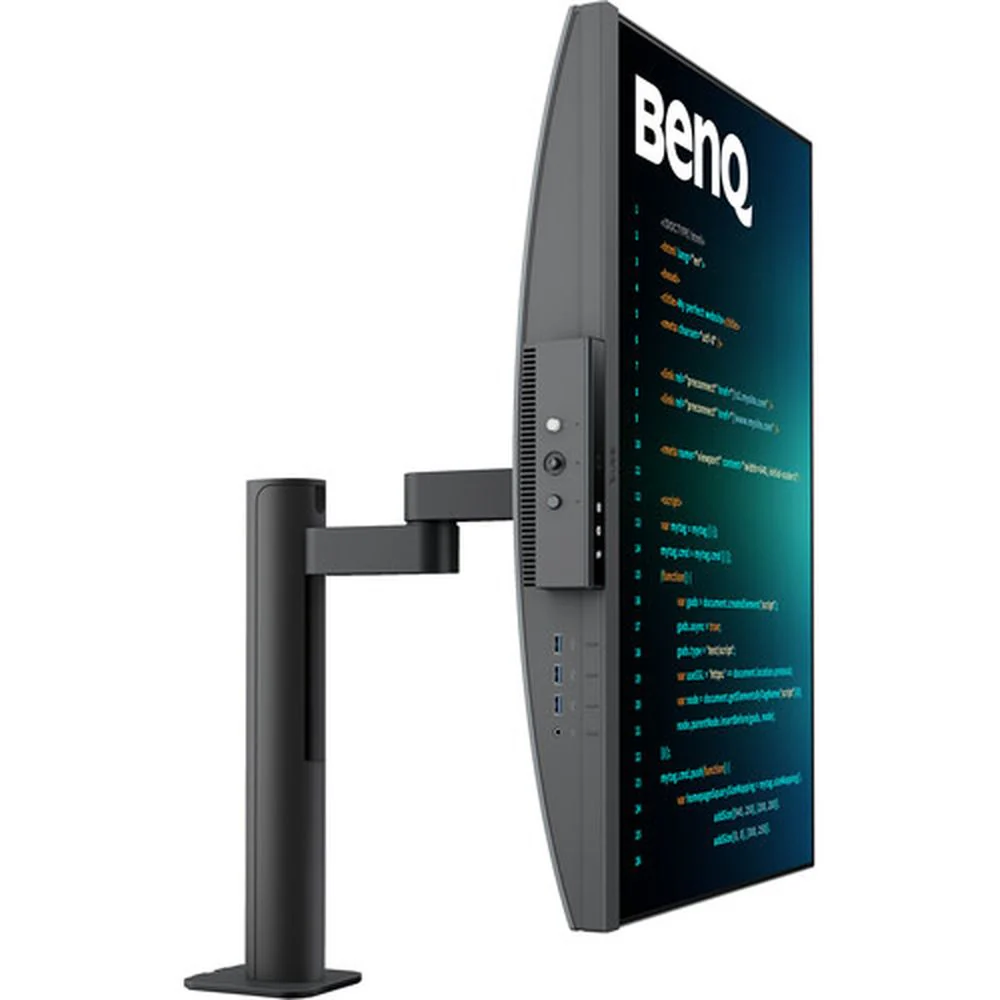
BENQ RD280UA 28 Inch UHD 60Hz IPS Panel 100% SRGB 5MS Professional Monitor

BENQ RD280UA 28 Inch UHD 60Hz IPS Panel 100% SRGB 5MS Professional Monitor

Features of BENQ RD280UA


Crystal-Clear Coding, Glare-Free Brilliance

Crafted for Programmers: BenQ RD280UA Programming Monitor offers you full immersion in your code no matter where you are.

Empowering Programmers with a Fine-Coated Panel

Unlock peak productivity with BenQ's exclusive anti-glare, anti-reflective Fine-Coated Panel designed for programmers. Elevate your coding experience with technology that minimizes distractions, maximizing focus for heightened productivity.

Superior Code Differentiation

BenQ's advanced coding modes ensure crystal-clear fonts and improved code differentiation, reducing eye strain during prolonged use.

Code with Comfort and Efficiency

Offer both dark and light themes for adaptable coding environments. Swiftly adjust brightness, sharpness, and contrast for optimal coding conditions.

Experience Focus Anytime with MoonHalo

Experience MoonHalo by BenQ – a seamless blend of immersive illumination and comforting ambiance. With customizable color temperature, brightness, and light modes, along with Auto Dimming powered by B.I. Gen2, MoonHalo ensures optimal eye protection and focus, anytime whether you're working from home or the office.

Take Control of Display Settings with Display Pilot 2

Display Pilot 2 is designed to meet your needs. Users can arrange preferred functions with ease, including MoonHalo, Shortcuts, Desktop Partition, Application Mode, Software Dimming, Circadian Mode, and more.

Easily Control the Built-in MoonHalo Bias Light

With Display Pilot 2, MoonHalo seamlessly synchronizes with your monitor, enhancing the ease of adjusting light settings, including Switch, Brightness, Color Temperature, Light Mode, and Non-stop Mode control.

Intelligent Circadian Displays for Comfortable Eyes

BenQ Low Blue Light Plus includes Circadian Mode, which automatically adjusts your screen's color temperature throughout the day, mirroring the natural sunrise to sunset cycle. Enjoy eye comfort worry-free.

Assign Different Modes to Applications

Application Mode makes it easy to assign different color modes and remembers your frequently-used settings for upcoming applications. Binding your IDE with RD series advanced coding modes for the state of flow!

Easily Organize Your Workspace with Desktop Partition

Launch Desktop Partition and drag the application you're working with into partitions by using preset templates or by customizing your own layouts. You can work more efficiency without the hassles of dragging and resizing.

Boost Efficiency with Display Pilot 2 Shortcuts

Exclusive Shortcuts allows you to easily bind commonly used functions to the hotkeys. With Display Pilot 2, copying and pasting shortcuts is no longer limited to one set at a time; it conveniently remembers two sets of content at once.

Enhancement for Maximum Physical Comfort

Enhance your coding workspace with adjustable height, tilt, pivot, and swivel capabilities for optimal efficiency and comfort.

Optimal Posture, Superior Output

Relieve prolonged neck and body aches. BenQ Programming Monitors prioritize your comfort for long-term projects.

Ergo Arm Stand : Elevating Coders' Desks with Infinite Flexibility

BenQ Ergo Arm enhances flexibility and provides the optimal screen position for a more comfortable and productive user experience.

Endless Horizons, Intuitive Workflows

Whether it's multi-screen integration or single-screen data comparison, a BenQ Programming Monitor meets your multitasking needs.

Achieve More and Scroll Less

With a rare 3:2 ratio design, RD280UA is crafted for coders to provide them with an expansive field of view.

Seamless Connectivity with Easy Plug and Play

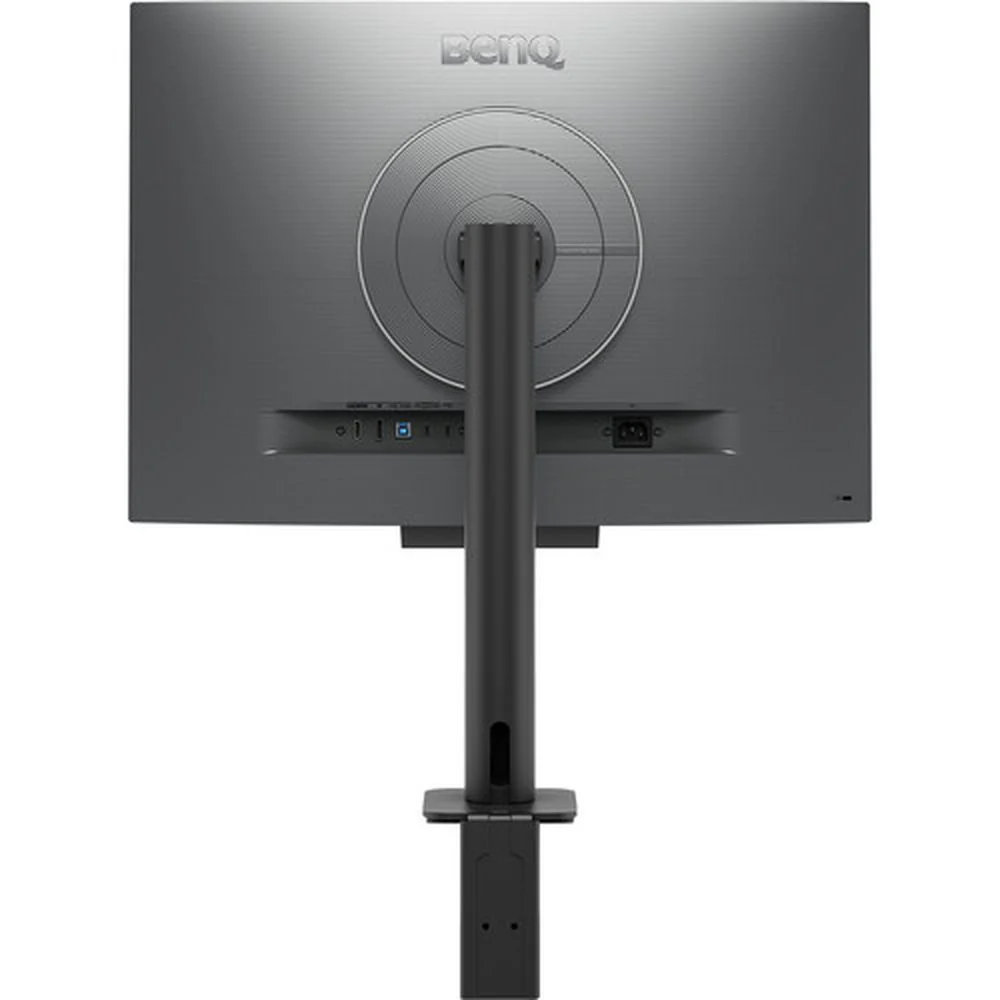
BenQ Programming Monitor offers ample port options, including USB Type-C for all-in-one connectivity.

Maximum Efficiency, Multitask with Ease

Maximum efficiency through unified integration with diverse devices and built-in KVM (keyboard, video, mouse) for seamless source switching.

Daisy Chain with the 90W USB Type-C

Multi-Stream Transport Technology allows you to extend screens across multiple displays using the USB Type-C. The 90W USB Type-C carries images, videos, and other data seamlessly and charges your mobile devices at the same time all with one cable.

Coding Hotkey and Function Bar for Hands-On Coding

Effortlessly boost productivity with our unique Coding HotKey and Function Bar designs. With a swift press of the Coding HotKey at the heart of the function bar, immerse yourself instantly into the coding realm.

Keep Your Eyes Fatigue-Free

Experience unmatched eye comfort during night hours with our Night Hours Protection and advanced Brightness Intelligence Gen2. BenQ Eye-Care Technology is dedicated to enhancing your visual comfort.

Night Hours Protection

Benefit from minimum brightness technology for reduced eye strain, discover enhanced eye protection during night hours and dark room usage with our Night Hours Protection. Its intelligent ambient light detection and auto-switch capabilities require minimal user intervention, ensuring effortless and consistent eye care.

Brightness Intelligence Gen2

BenQ B.I. Gen2 emphasizes automatic detection of environmental brightness for automated screen brightness adjustments, while also providing the option for manually fine-tune the brightness.

TUV Reflection Free Certified to Ensure Coding with Refreshed Eyes

Being TUV Reflection Free Certificated ensures coding with minimized distractions, fostering a clearer and more efficient development process. Global safety authority TÜV Rheinland also certifies RD280UA's Low Blue Light as truly friendly to the human eye. Eyesafe 2.0 certification ensures that the display reduces blue light while maintaining vivid color.

BenQ’s Green Commitment : A Vision of Sustainability

BenQ prioritizes eco-friendly practices in our product development, underlining our commitment to sustainability. BenQ Programming Monitors incorporate eco-friendly technology, recycled materials, and energy-efficient design.


Specifications of BENQ RD280UA


Display Size 28.2"
Panel Type IPS-Type LCD
Aspect Ratio 3:2
Native Resolution 3840 x 2560
Maximum Brightness 400 nits / cd/m2 (Peak in HDR Mode)
350 nits / cd/m2 (Sustained)
HDR Support Yes, HDR10
Contrast Ratio 1200:1
Response Time 5 ms
Refresh Rate 60 Hz
Variable Refresh Technology No
Color Support 1.07 Billion Colors (10-Bit)
Color Gamut 95% DCI-P3
Viewing Angle (H x V) 178 x 178°
Dot Pitch 0.1552 x 0.1552 mm
Pixels Per Inch (ppi) 164 ppi
Finish Anti-Glare / Matte
Touchscreen Technology No
Inputs 1x HDMI 2.0
1x DisplayPort 1.4
Outputs 1x 1/8" / 3.5 mm
HDCP Support Yes, Version 2.2
USB I/O 2x USB-C 3.0 / 3.1/3.2 Gen 1 (Charging/DisplayPort Alt Mode)
3x USB-A 3.0 / 3.1/3.2 Gen 1
1x USB-B 3.0 / 3.1/3.2 Gen 1
USB Power Delivery 90 W (via USB-C)
Multi-Input Support (PIP/PBP) No
Built-In Speakers Yes, 2x 2 W
Power Consumption Typical: 34.0 W
Maximum: 205.0 W
Standby: 0.5 W
Input Power 100 to 240 VAC, 50 / 60 Hz
Power Adapter Type Internal
Certifications ENERGY STAR 8.0, TCO Certified 9.0, EPEAT Bronze
Adjustments Height: 5.1" / 130 mm
Tilt: -5 to 20°
Rotation: 90°
Swivel: 550° (-275 to 275°)
Swivel: 0°
Mounting-Hole Pattern 100 x 100 mm
Lock Slot No
Dimensions 28.8 x 24 x 18.7" / 732.2 x 610.4 x 476 mm (with Stand)
24 x 16.8 x 3.4" / 610.4 x 427.8 x 87.1 mm (without Stand)
Weight 25.1 lb / 11.4 kg (with Stand)
16.5 lb / 7.5 kg (without Stand)
Package Weight 36.5 lb
Box Dimensions (LxWxH) 30.5 x 20 x 11"
$555.00
BENQ RD280UA 28 Inch UHD 60Hz IPS Panel 100% SRGB 5MS Professional Monitor
$555.00

Product Information

Shipping & Returns

Description

Features of BENQ RD280UA


Crystal-Clear Coding, Glare-Free Brilliance

Crafted for Programmers: BenQ RD280UA Programming Monitor offers you full immersion in your code no matter where you are.

Empowering Programmers with a Fine-Coated Panel

Unlock peak productivity with BenQ's exclusive anti-glare, anti-reflective Fine-Coated Panel designed for programmers. Elevate your coding experience with technology that minimizes distractions, maximizing focus for heightened productivity.

Superior Code Differentiation

BenQ's advanced coding modes ensure crystal-clear fonts and improved code differentiation, reducing eye strain during prolonged use.

Code with Comfort and Efficiency

Offer both dark and light themes for adaptable coding environments. Swiftly adjust brightness, sharpness, and contrast for optimal coding conditions.

Experience Focus Anytime with MoonHalo

Experience MoonHalo by BenQ – a seamless blend of immersive illumination and comforting ambiance. With customizable color temperature, brightness, and light modes, along with Auto Dimming powered by B.I. Gen2, MoonHalo ensures optimal eye protection and focus, anytime whether you're working from home or the office.

Take Control of Display Settings with Display Pilot 2

Display Pilot 2 is designed to meet your needs. Users can arrange preferred functions with ease, including MoonHalo, Shortcuts, Desktop Partition, Application Mode, Software Dimming, Circadian Mode, and more.

Easily Control the Built-in MoonHalo Bias Light

With Display Pilot 2, MoonHalo seamlessly synchronizes with your monitor, enhancing the ease of adjusting light settings, including Switch, Brightness, Color Temperature, Light Mode, and Non-stop Mode control.

Intelligent Circadian Displays for Comfortable Eyes

BenQ Low Blue Light Plus includes Circadian Mode, which automatically adjusts your screen's color temperature throughout the day, mirroring the natural sunrise to sunset cycle. Enjoy eye comfort worry-free.

Assign Different Modes to Applications

Application Mode makes it easy to assign different color modes and remembers your frequently-used settings for upcoming applications. Binding your IDE with RD series advanced coding modes for the state of flow!

Easily Organize Your Workspace with Desktop Partition

Launch Desktop Partition and drag the application you're working with into partitions by using preset templates or by customizing your own layouts. You can work more efficiency without the hassles of dragging and resizing.

Boost Efficiency with Display Pilot 2 Shortcuts

Exclusive Shortcuts allows you to easily bind commonly used functions to the hotkeys. With Display Pilot 2, copying and pasting shortcuts is no longer limited to one set at a time; it conveniently remembers two sets of content at once.

Enhancement for Maximum Physical Comfort

Enhance your coding workspace with adjustable height, tilt, pivot, and swivel capabilities for optimal efficiency and comfort.

Optimal Posture, Superior Output

Relieve prolonged neck and body aches. BenQ Programming Monitors prioritize your comfort for long-term projects.

Ergo Arm Stand : Elevating Coders' Desks with Infinite Flexibility

BenQ Ergo Arm enhances flexibility and provides the optimal screen position for a more comfortable and productive user experience.

Endless Horizons, Intuitive Workflows

Whether it's multi-screen integration or single-screen data comparison, a BenQ Programming Monitor meets your multitasking needs.

Achieve More and Scroll Less

With a rare 3:2 ratio design, RD280UA is crafted for coders to provide them with an expansive field of view.

Seamless Connectivity with Easy Plug and Play

BenQ Programming Monitor offers ample port options, including USB Type-C for all-in-one connectivity.

Maximum Efficiency, Multitask with Ease

Maximum efficiency through unified integration with diverse devices and built-in KVM (keyboard, video, mouse) for seamless source switching.

Daisy Chain with the 90W USB Type-C

Multi-Stream Transport Technology allows you to extend screens across multiple displays using the USB Type-C. The 90W USB Type-C carries images, videos, and other data seamlessly and charges your mobile devices at the same time all with one cable.

Coding Hotkey and Function Bar for Hands-On Coding

Effortlessly boost productivity with our unique Coding HotKey and Function Bar designs. With a swift press of the Coding HotKey at the heart of the function bar, immerse yourself instantly into the coding realm.

Keep Your Eyes Fatigue-Free

Experience unmatched eye comfort during night hours with our Night Hours Protection and advanced Brightness Intelligence Gen2. BenQ Eye-Care Technology is dedicated to enhancing your visual comfort.

Night Hours Protection

Benefit from minimum brightness technology for reduced eye strain, discover enhanced eye protection during night hours and dark room usage with our Night Hours Protection. Its intelligent ambient light detection and auto-switch capabilities require minimal user intervention, ensuring effortless and consistent eye care.

Brightness Intelligence Gen2

BenQ B.I. Gen2 emphasizes automatic detection of environmental brightness for automated screen brightness adjustments, while also providing the option for manually fine-tune the brightness.

TUV Reflection Free Certified to Ensure Coding with Refreshed Eyes

Being TUV Reflection Free Certificated ensures coding with minimized distractions, fostering a clearer and more efficient development process. Global safety authority TÜV Rheinland also certifies RD280UA's Low Blue Light as truly friendly to the human eye. Eyesafe 2.0 certification ensures that the display reduces blue light while maintaining vivid color.

BenQ’s Green Commitment : A Vision of Sustainability

BenQ prioritizes eco-friendly practices in our product development, underlining our commitment to sustainability. BenQ Programming Monitors incorporate eco-friendly technology, recycled materials, and energy-efficient design.


Specifications of BENQ RD280UA


Display Size 28.2"
Panel Type IPS-Type LCD
Aspect Ratio 3:2
Native Resolution 3840 x 2560
Maximum Brightness 400 nits / cd/m2 (Peak in HDR Mode)
350 nits / cd/m2 (Sustained)
HDR Support Yes, HDR10
Contrast Ratio 1200:1
Response Time 5 ms
Refresh Rate 60 Hz
Variable Refresh Technology No
Color Support 1.07 Billion Colors (10-Bit)
Color Gamut 95% DCI-P3
Viewing Angle (H x V) 178 x 178°
Dot Pitch 0.1552 x 0.1552 mm
Pixels Per Inch (ppi) 164 ppi
Finish Anti-Glare / Matte
Touchscreen Technology No
Inputs 1x HDMI 2.0
1x DisplayPort 1.4
Outputs 1x 1/8" / 3.5 mm
HDCP Support Yes, Version 2.2
USB I/O 2x USB-C 3.0 / 3.1/3.2 Gen 1 (Charging/DisplayPort Alt Mode)
3x USB-A 3.0 / 3.1/3.2 Gen 1
1x USB-B 3.0 / 3.1/3.2 Gen 1
USB Power Delivery 90 W (via USB-C)
Multi-Input Support (PIP/PBP) No
Built-In Speakers Yes, 2x 2 W
Power Consumption Typical: 34.0 W
Maximum: 205.0 W
Standby: 0.5 W
Input Power 100 to 240 VAC, 50 / 60 Hz
Power Adapter Type Internal
Certifications ENERGY STAR 8.0, TCO Certified 9.0, EPEAT Bronze
Adjustments Height: 5.1" / 130 mm
Tilt: -5 to 20°
Rotation: 90°
Swivel: 550° (-275 to 275°)
Swivel: 0°
Mounting-Hole Pattern 100 x 100 mm
Lock Slot No
Dimensions 28.8 x 24 x 18.7" / 732.2 x 610.4 x 476 mm (with Stand)
24 x 16.8 x 3.4" / 610.4 x 427.8 x 87.1 mm (without Stand)
Weight 25.1 lb / 11.4 kg (with Stand)
16.5 lb / 7.5 kg (without Stand)
Package Weight 36.5 lb
Box Dimensions (LxWxH) 30.5 x 20 x 11"
BENQ RD280UA 28 Inch UHD 60Hz IPS Panel 100% SRGB 5MS Professional Monitor | EliteHubs